PsiTransfer: Quick & Private File Sharing
Who can use this: Everyone, no account needed.
What is Temporary File Sharing?
Sometimes you need to send files that are too big for email, or share sensitive documents that shouldn't stay online forever.
-
Temporary sharing is like giving someone a package that disappears after they open it or after a set time.
-
Benefits: It keeps our server clean and fast. It is safer because old files do not stay online where they could be found later. It is perfect for sending large work documents, design files, or private data that only needs to be shared once.
What is PsiTransfer?
PsiTransfer is our simple, self-hosted tool for sharing files.
-
It lets you upload big files easily (even larger than 1 GB).
-
It creates a special link that you can send to anyone.
-
It is designed to be private and secure.
Secure file transfer:
This is why PsiTransfer is great:
-
GDPR Compliant: Because files are deleted automatically, we follow strict European privacy rules. We do not keep your data longer than necessary.
-
Password Protection: You must set a password for every upload.
-
Server Owner Cannot See: Even the owner of this server cannot see into the content of your files. The list of files is encrypted in your browser before it reaches our server. If you lose the password, the files are gone forever (even for us!). This ensures total privacy.
How to Use It
Using PsiTransfer is very simple.
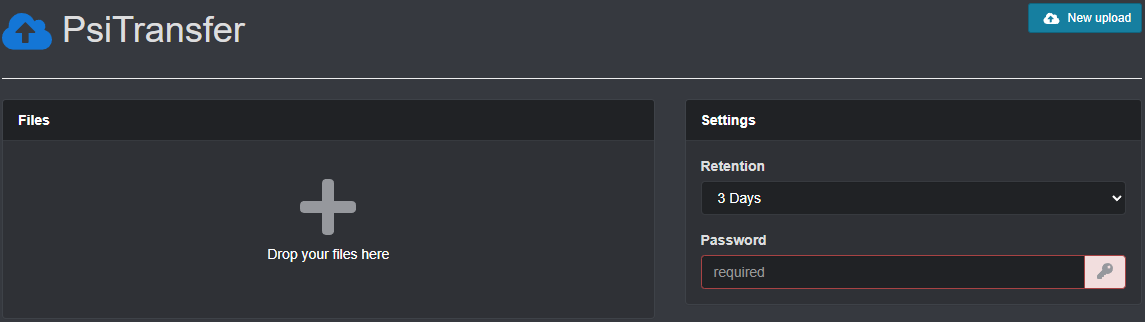
- Go to the website: Open your browser and visit https://file.necc.me
-
Select Files: Click the + button or drag and drop your files into the box.
-
Set a Password:
-
You must enter a password to protect your files.
-
Tip: You can use any password you like! It does not need to be complex (e.g., "pizza" is fine). Just make sure to tell the person you are sending it to what the password is.
-
-
Choose How Long to Keep:
-
You cannot keep files forever. You must choose a time (like 1 day, 1 week) or "One-time download" (deletes immediately after the first person downloads it).
-
-
Upload: Click the Upload button.
-
Share: You will get a special link. Send this link and the password to your friend or colleague.
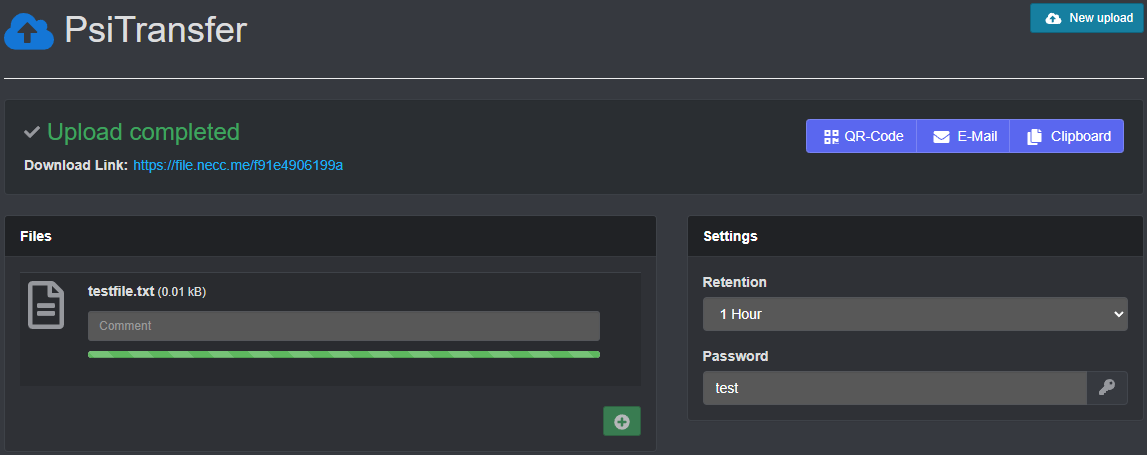
Once the time is up or the file is downloaded (if you chose one-time), the files are deleted automatically!